
Epson EcoTank L3560 Colour Printer Review: A Home Office Workhorse with a Digital Army
For the growing number of people where home offices are the new norm, finding a reliable, cost-effective printer that doesn't guzzle ink like the Kalahari is a godsend. Enter the Epson EcoTank L3560, a compact all-in-one color inkjet printer designed for budget-conscious users who need versatility without the hassle of frequent cartridge replacements. Launched as
Epson EcoTank L3560 Colour Printer Review: A Home Office Workhorse with a Digital Army
For the growing number of people where home offices are the new norm, finding a reliable, cost-effective printer that doesn’t guzzle ink like the Kalahari is a godsend. Enter the Epson EcoTank L3560, a compact all-in-one color inkjet printer designed for budget-conscious users who need versatility without the hassle of frequent cartridge replacements.
Launched as part of Epson’s EcoTank lineup, this model promises up to 90-95% savings on printing costs, making it ideal for small businesses, students, or remote workers in busy households. Priced around R3,500-R4,500 in South Africa (as of early 2026), it’s a step up from basic models but delivers premium features like Wi-Fi connectivity and borderless photo printing. After testing it for a week in a typical home setup—printing reports, scanning receipts, and copying kids’ homework—I’m impressed by its balance of performance and economy. But does it live up to the promise?
Design and Build Quality
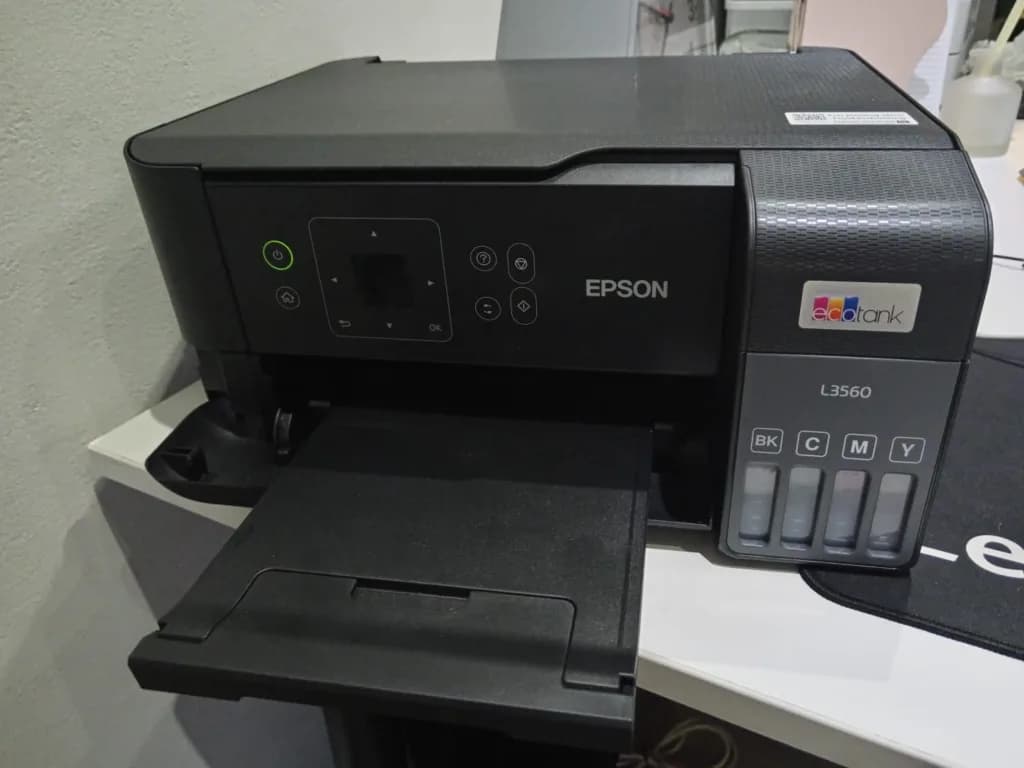
The L3560 sports a sleek, matte black finish with a compact footprint (37.5 x 34.7 x 18.7 cm) that fits snugly on a desk without dominating the space. Weighing just 4.1 kg, it’s easy to move around, perfect for shared home offices. The integrated ink tanks are front-facing, with spill-free, key-lock bottles that make refilling a simple, mess-free task – no more stained fingers or spilling from refill cartridges.
Setup is straightforward: Unbox, fill the tanks (which come with enough ink for up to 6,600 black and 5,900 colour pages), and connect via USB or Wi-Fi. The 3.7cm colour LCD screen is useful for navigating menus, though it’s a little small for my liking and its not touchscreen, however the buttons handle most operations intuitively.
Build-wise, it’s mostly plastic, which keeps costs down but feels a tad flimsy compared to pricier laser models. Still, Epson’s PrecisionCore Heat-Free Technology shines here: No heat means lower energy use (about 12W printing) and fewer replacement parts, enhancing durability for light-to-moderate use (up to 1,000 pages/month recommended). The 100-sheet rear tray handles up to A4 paper sheets, envelopes, and photo paper, but don’t expect auto-duplexing, manual two-sided printing is your eco-friendly workaround.
Printing Performance
At the heart of the L3560 is its printing prowess. Using dye-based inks, it delivers sharp, vibrant colors with a resolution up to 4,800 x 1,200 DPI—excellent for photos and graphics. In tests, black text printed at 15 ppm (ISO/IEC 24734 standard), while color hit 8 ppm, with draft modes pushing 33 ppm mono and 20 ppm color for quick jobs. Borderless 4×6-inch photos emerge in about 69 seconds, with natural skin tones and minimal banding, rivaling dedicated photo printers.
Quality is a standout: Text is crisp, even on plain paper, and colors pop without oversaturation. It’s not the fastest for high-volume tasks you should expect minor delays on complex documents, but for home use, it’s efficient. Noise levels are low (around 50dB), and the heat-free tech means no warm-up time, saving power and reducing wear.
Scanning and Copying
As a multifunction device, the L3560 performs well in scanning and copying. The flatbed scanner handles up to A4 size at 1,200 x 2,400 DPI, producing clear, detailed scans in JPEG, PDF, or searchable PDF formats. Copying is quick—up to 7.7 ipm black and 3.8 ipm color—with options for multi-page or ID card duplication. It’s not ADF-equipped, so manual placement is needed for batches, but for occasional use, it’s fine.
The Digital Ecosystem: An Army of Connectivity Tools
What elevates the L3560 beyond a basic printer is Epson’s robust digital suite that is truly an “army” of tools that turn it into a connected hub for the modern home office. At the forefront is Epson Connect, a cloud-based service that lets you print and scan from anywhere with an internet connection. Register your printer online, and you unlock features like Epson Email Print: Assign an email address to your printer, then send documents from any device worldwide for instant printing.
Scanning gets a major boost with Scan to Cloud. From the LCD panel or app, scan documents directly to services like Dropbox, Google Drive, Box, Evernote, or Microsoft OneDrive with no computer required. This is a game-changer for remote workers: Scan a contract in your home office, upload it to the cloud, and access it from your phone during a meeting or when required. Security is solid with encrypted transfers, and you can preset destinations for quick workflows.
The Epson Smart Panel app (iOS/Android) acts as mission control: Setup Wi-Fi, monitor ink levels, troubleshoot errors, and even voice-activate printing via Alexa or Google Assistant. Epson iPrint adds mobile printing/scanning, while AirPrint and Mopria ensure seamless integration with Apple and Android devices. For Windows/Mac users, Epson ScanSmart software enhances scans with auto-cropping, OCR for editable text, and direct email/cloud sharing. This ecosystem isn’t just add-ons; it’s integrated, making the L3560 a portal to a paperless workflow such as scanning receipts to cloud storage, print from shared drives, or remote-print photos or presentations.
Cost, Value, and Drawbacks
The real win is value: Initial inks last years (equivalent to 66 cartridges), with refills costing cents per page, translating to under 50 cents per page locally. Over time, it pays for itself versus cartridge models.
Pros: Ultra-low running costs, excellent print quality, robust digital features, easy mobile/cloud integration, energy-efficient.
Cons: No automatic duplexing, plastic build feels basic, scanning lacks ADF for heavy users, and setup requires a stable Wi-Fi (initial pairing can glitch). It’s not ideal for high-volume offices.
Final Verdict
The Epson EcoTank L3560 isn’t just a printer; it’s a smart, connected home-office ally for the hybrid work era. With stellar cost savings, solid performance, and an impressive digital arsenal, from Scan to Cloud for global access to apps that streamline everything, it’s a top pick for South African homes juggling work, school, and creativity. If you’re tired of ink rip-offs and want a device that evolves with your digital life, the L3560 delivers.
Printer Score: 8.5/10. Highly recommended for under R5,000 setups.